Gemini’s native image editing capabilities represent a major leap forward in creative photo enhancement, empowering users to modify, remix, and reimagine images at the tap of a screen. With breakthroughs like Google DeepMind’s Nano Banana update, the Gemini app enables anyone, from hobbyist photographers to professional creators, to access advanced AI-powered tools without a steep learning curve. From changing backgrounds and removing unwanted objects to blending multiple scenes or turning a pet into a whimsical video game character, Gemini offers unparalleled creative flexibility.
Whether the goal is to clean up vacation snapshots, add artistic flair to social media content, or tell a visual story, Gemini’s prompt-based editing is intuitive and fun. The AI model keeps image details consistent even across several edits, supports multi-turn conversational command refinement, and applies high-quality styles like pencil sketches and watercolor paintings. With a robust layer of digital watermarking to preserve authenticity, Gemini’s suite of image tools is well-suited for the demands of modern content sharing. Embracing Gemini means stepping into a future where imagination and machine intelligence work seamlessly to generate brilliant, production-ready visuals in seconds.
10 Powerful AI Photo Edits You Can Do With Gemini
In an era where visual content dominates digital platforms, Google’s Gemini app is redefining the boundaries of photo editing. Thanks to its innovative Nano Banana model, users are now able to transform images with prompts that once seemed impossible to realize without specialist software or graphic design skills. Whether aiming to create artistic masterpieces, produce engaging social content, or simply enhance everyday photos, Gemini’s new native image editing tools are making creativity more accessible than ever.

Change the Mood of a Photo: With a short description, users can alter the entire atmosphere of an image, shifting it from gloomy to cheerful or transforming its tone into something mysterious or surreal.
Boost Colors and Details: Gemini’s editing suite can enhance vibrancy, saturation, and texture, making photos pop while still maintaining a natural look.
Object Removal Made Easy: Distracting elements like power lines or passersby can be erased with a single prompt, cleaning up compositions instantly.
Blur Backgrounds for Focus: The app’s smart depth-of-field effect mimics professional portrait lenses, making subjects stand out beautifully.
Apply Artistic Filters: Users can convert ordinary pictures into digital artwork, with styles ranging from watercolors to pencil sketches and oil paintings.
Add Realistic Effects: From mist and golden sunlight to snowfall and reflections, Gemini enables users to inject a sense of atmosphere and realism into any scene.
Background Replacement: Seamlessly swap a flat sky for a breathtaking sunset or transport subjects into imaginative new environments by changing backgrounds with precision.
Create Hybrid Scenes: Blend two or more photos into a cohesive composition, combining faces, places, or objects for creative storytelling, collage, or style transfer.
Generate 3D Models and Miniatures: The Nano Banana model doesn’t just edit flat photos—it can generate highly realistic 3D figurines and insert them into scenes, turning pets or objects into keepsake miniatures.
Iterative Multi-Turn Editing: Gemini’s conversational interface lets users refine their edits step-by-step, building complex visual changes, such as altering clothing, home exteriors, or even telling an entire narrative in comic strip form—all while keeping subjects consistent across images.
Security and authenticity remain central to Gemini’s capabilities. All AI-generated or edited images include invisible SynthID digital watermarks, and visible watermarks are being piloted, which help to distinguish original photos from AI-altered creations. This commitment to transparency positions Gemini not just as a tool for fun and expression, but also for responsible digital creativity.
10 Ways Gemini’s AI Image Editing Can Transform Your Photos
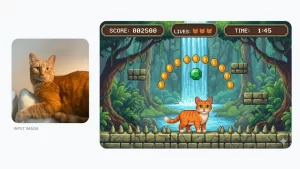
Prompt: Recreate this cat as a 16-bit video game character, and place the character in a level of a 2D 16-bit platform video game.
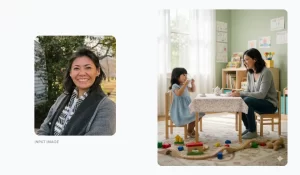
Pic 1 : photo of an adult woman. On the right: Photo of adult woman with a younger version of herself, both smiling, having a tea party in a playroom.
Prompt: Here’s a picture of me as an adult. Create a photo of me as an adult sitting with myself as a child in a playroom having a tea party together.
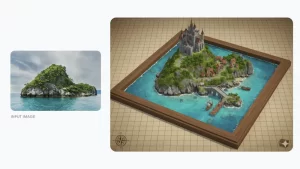
Pic 2 : a lush, rocky island rising from a body of water. On the right: a stylized 3D map of the island, in a brown frame on a grid.
Prompt: Turn this photo into a map of a stylized 3D world for a fantasy game. Include a village and harbor.
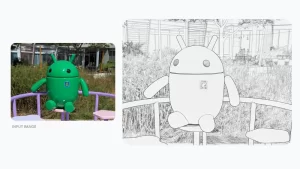
Pic 3 : a green Android bot sitting on a purple stool in front of a purple rail and green grass. On the right: The photo as a pencil drawing.
Prompt: Turn this photo into a pencil drawing.
Pic 4: A flat lay of baking ingredients including cocoa powder and lemon next to a striped blue and white dish towel. On the right: a chocolate and lemon dessert plated elegantly on a dark dish.
Prompt: Turn these ingredients into a refined delicious-looking dessert, inspired by these ingredients. Plate it as if it were a dish at a 5-star avant-garde restaurant.

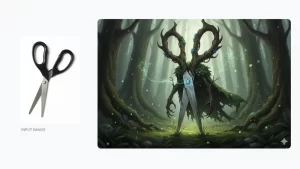
Pic 5: a pair of scissors with black handles. On the right: A drawing of the scissors in a fantastical forest with wooden handles, wooden arms and a plant cape
Prompt: Turn these scissors into a realistic-looking fantasy character in a movie about elves and fairies.
Pic 6 : a Cavalier King Charles Spaniel lying down. On the right: a small 3D model of the dog on a desk surrounded by blue wrapping paper and colorful ribbons.
Prompt: Create a realistic-looking small 3D model of this dog. Place the model on a desk next to birthday packaging that makes it look like someone unwrapped the model as a gift.

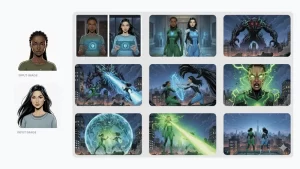
Pic 7 : Two cartoon images of women characters. On the right: A 9-part comic story centering the two characters as superheroes.
Prompt: Create a riveting epic 9 part story with 9 images with these two protagonists and their adventures as secret superheroes. The story is thrilling throughout with emotional highs and lows and ending on a great twist and high note. Do not include any words or text on the images but tell the story purely through the imagery itself.
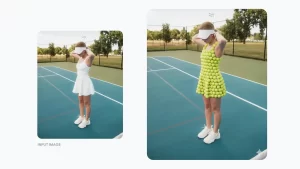
Pic 8 : a woman in a white dress on a tennis court. On the right: a woman in a dress made of tennis balls on a tennis court.
Prompt: Change this person’s dress to be made out of tennis balls.
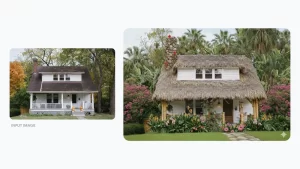
Pic 9 : a white house with white columns and a dark brown roof behind a plain grass lawn. On the right: a white house with a thatched roof and bamboo columns behind a lush tropical garden.
Prompt 10 : Transform this house into a vibrant tropical island design. Replace the roof with thatch and add bamboo structural elements. Surround it with lush, colorful tropical plants and palm trees.
Conclusion
Gemini’s native image editing marks a new chapter for both casual users and seasoned content creators. By blending ease of use with sophisticated AI, Gemini transforms how people interact with digital images—making high-level, imaginative photo edits possible for anyone with a smartphone or computer. The future of visual storytelling, powered by AI, is here, and it’s more vibrant, flexible, and inspiring than ever.
3. Five Frequently Asked Questions (FAQs)
1. Can Gemini edit images uploaded from my phone or just images it generates?
Yes, Gemini supports editing both uploaded images and those generated within the app, giving users full flexibility.
2. Are there any watermarks on photos edited by Gemini?
All AI-edited or generated images in Gemini contain an invisible SynthID digital watermark, with visible options being experimented with for enhanced transparency.
3. How precise are object removal and background changes in Gemini?
Gemini uses advanced AI to seamlessly remove or alter elements like backgrounds, integrating edits naturally with the photo’s lighting and style.
4. Does Gemini allow multi-step or conversational editing?
Yes! Users can issue multiple sequential commands, refining their edits step-by-step in a conversational workflow.
5. Is Gemini’s image editing available worldwide and in different languages?
The rollout covers over 45 languages and most countries, making Gemini’s advanced editing features widely accessible.
AIzCahkkkaUAfKbJutkhygg
Your comment is awaiting moderation.